Guide
How to connect Apple Health to Claude
There are a few ways to get your Apple Health and Apple Watch data into Claude. This guide covers which Claude plans support it, how the options differ, the setup steps for a hosted connector, what Claude can and cannot read, and what to do when it does not work.
 Samuel KraftUpdated
Summary
- Every Claude plan supports custom connectors. The Free plan allows one.
- Apple Health lives on your iPhone and has no cloud API. Every option starts with an app on the phone, or an export.
- A hosted connector works in Claude on your phone and your computer. The export options are one-off.
- Shape is built for endurance sports. It gives Claude your workouts and the health metrics that matter for training, not the whole of Apple Health.
- Anything that writes to Apple Health comes along: Apple Watch, Oura, WHOOP, Zwift, Peloton, Polar, Suunto, COROS and more. One permission covers them all.
Which Claude plans support this
All of them. Claude connects to external tools through MCP, and custom connectors are available on Free, Pro, Max, Team and Enterprise. The Free plan is limited to one custom connector.
Claude Desktop, claude.ai and the Claude mobile apps add a connector from the Connectors screen. Claude Code and other developer tools take the same server URL from a command or a config file. Both are covered below.
Ways to connect Apple Health to Claude
Apple Health is a database on your iPhone. Apple does not expose it over the internet, so nothing can read it except an app on that phone, or a file you export from the Health app. Every option below is one of those two, and they differ in whether the data keeps flowing or has to be exported again, whether it works from your phone, and whether Claude can put workouts back on your watch.
| Option | Runs on | Reads Health via | Phone | Writes workouts | Cost |
|---|---|---|---|---|---|
Training platform with an iPhone app Shape and similar training platforms | Hosted | The platform's iPhone app | Yes | Yes, to Apple Watch | Subscription |
Health exporter with a connector Apps that sync Apple Health to a server | Hosted | The exporter's iPhone app | Yes | No | Free to a small subscription |
Local MCP server Open source projects on GitHub | Your computer | The Health export file | No | No | Free |
Shortcuts Apple's Shortcuts app | Your iPhone | Find Health Samples | Yes | No | Free |
File export Export All Health Data | No server | One XML file | Yes | No | Free |
Training platform with an iPhone app
Training platforms with an iPhone app, Shape among them, work like this. You install the app, grant it Health access once, and it reads your workouts and daily health data and keeps them on its server. Claude talks to the platform. New workouts are delivered in the background, so you do not have to open the app for a run to show up. The platform also knows about planned workouts and training load, which the other options do not, and it can put a planned session in the Workout app on your Apple Watch. It costs a subscription.
Health exporter with a connector
Several apps exist only to copy Apple Health to a server and give you a URL to paste into Claude. They tend to cover more of Apple Health than a training platform does, nutrition and vitals included, which makes them the better pick if that is what you are after. They do not understand training: no planned workouts, no load, nothing written back to the watch. Before choosing one, check which categories it syncs and how often.
Local MCP server
Open source projects on GitHub parse the Health export file on your computer and expose it to Claude Desktop. They are free and read every category in the export. You need Python or Node installed, you have to export from the Health app again whenever you want fresh data, and the server only runs while the process is open on that computer. It does not work from a phone.
Shortcuts
Apple’s Shortcuts app has a Find Health Samples action that can pull a category, say last week’s sleep or resting heart rate, into text you can paste into a Claude chat. Nothing to install and no account. It is a manual step every time, and workouts come out as a list of totals, not the heart rate or pace inside them.
File export
In the Health app, open your profile and choose Export All Health Data. You get a zip with one XML file covering everything the phone has ever recorded, often hundreds of megabytes. That is too large to drop into a chat as is, so it needs trimming with a script first, which is what the local servers above do for you.
Set up a hosted connector
These steps use Shape. The Claude part is the same for any hosted connector, so if you picked another one, use its URL in step 2.
- 1
Connect Apple Health in the Shape iOS app
Create a Shape account and install the iOS app. Go to Settings, Connections, and choose Apple Health. The iOS permission sheet opens, allow the categories it asks for. Your recent workouts start importing, with their heart rate, pace and route, along with your daily health data. A second prompt asks to sync planned workouts to your Apple Watch, accept it if you want Claude’s sessions on your wrist.
- 2
Add the connector in Claude
Add to ClaudeOpens claude.ai with the connector filled in.Or by hand: in Claude Desktop, claude.ai or the mobile app, go to Settings, Connectors, press Add and choose Add custom connector. Paste this URL:
https://shapecalendar.com/mcpClaude detects the sign-in method. Keep the defaults and continue. A Shape screen opens in your browser, approve it. Then open the connector and set the read-only tools to Always allow, so Claude does not ask on every message.
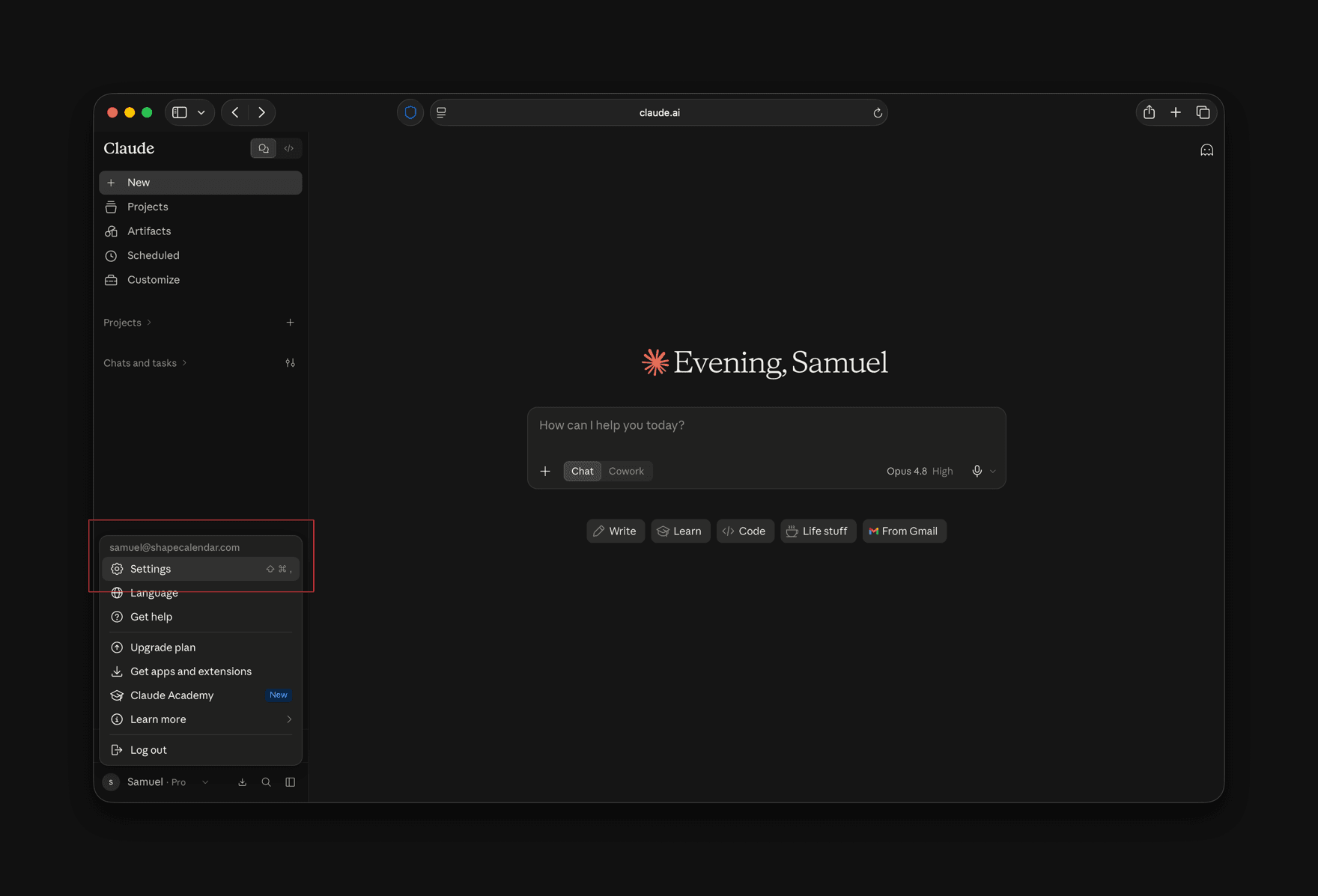
1. Open the account menu at the bottom left and choose Settings.
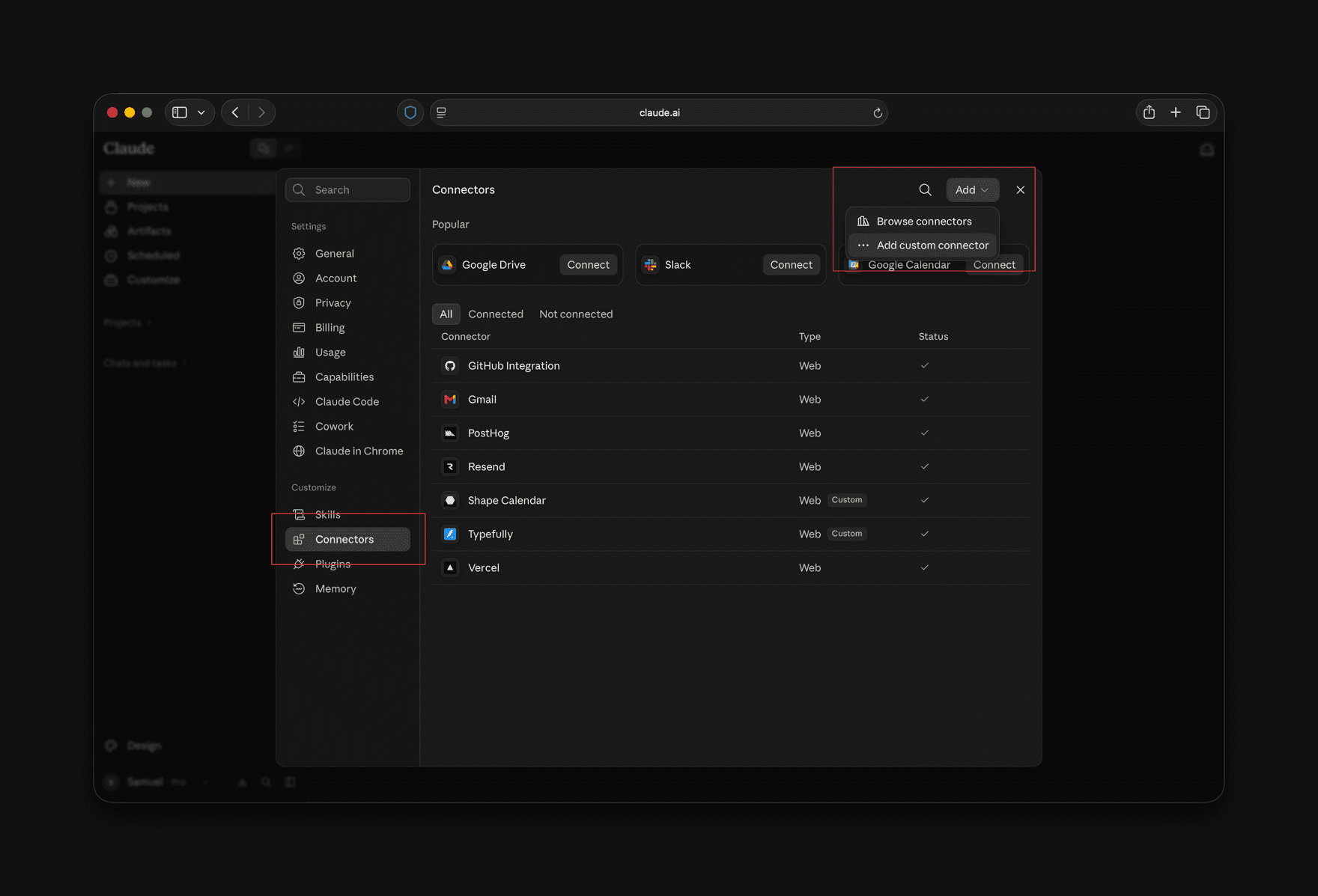
2. Go to Connectors, press Add, then Add custom connector.
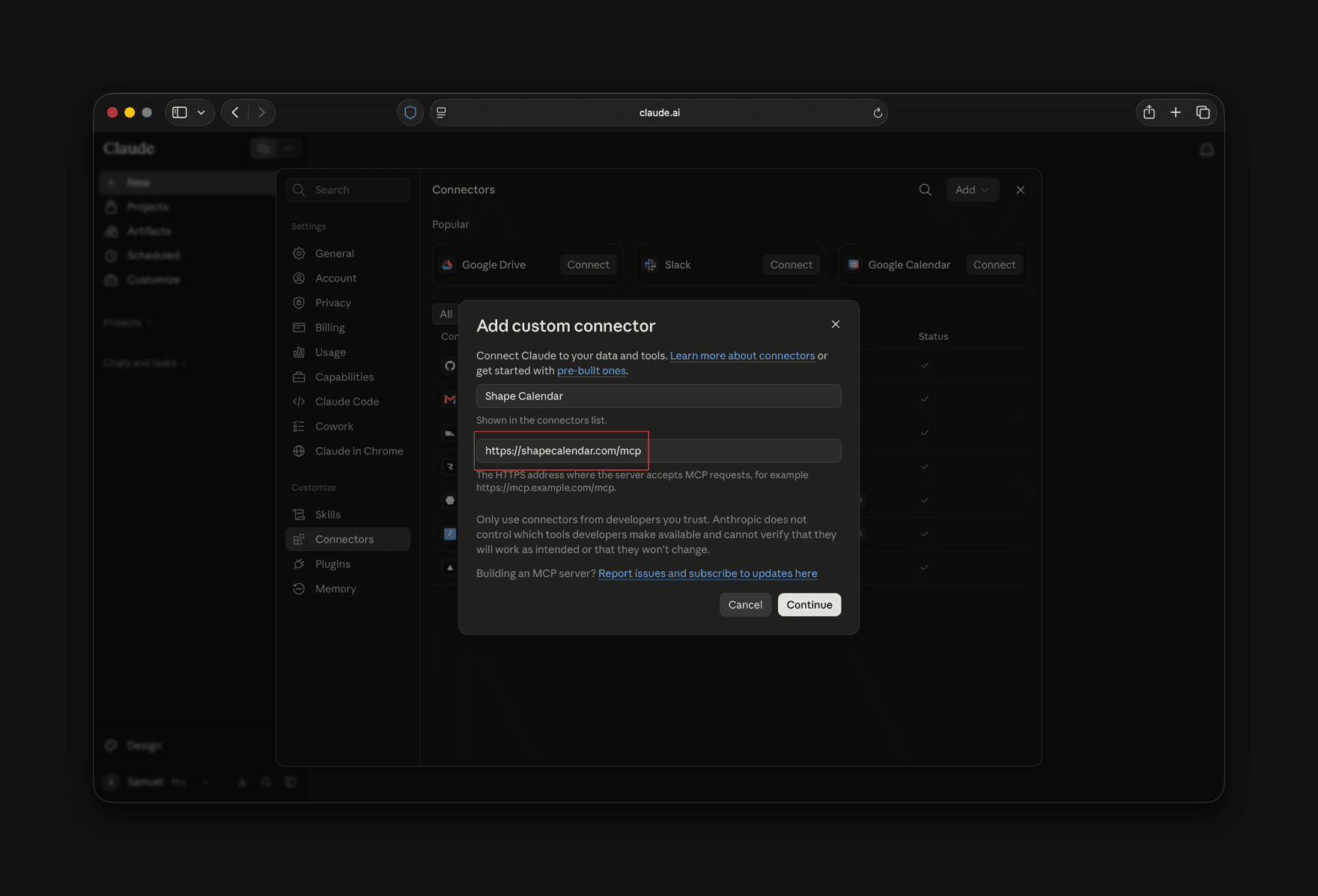
3. Give it a name and paste https://shapecalendar.com/mcp as the URL, then press Continue.
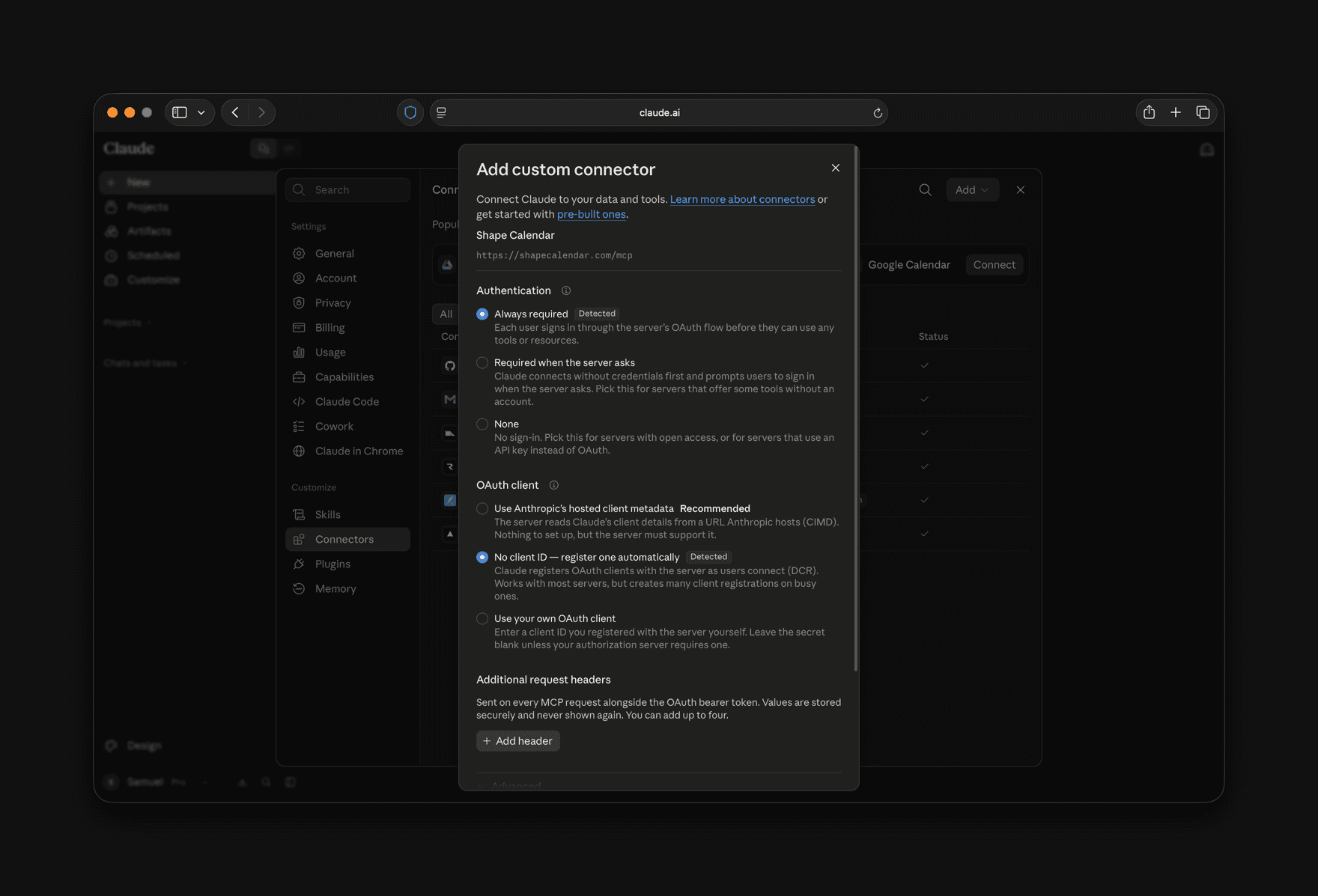
4. Claude detects the sign-in method on its own. Keep the defaults and continue. A Shape screen opens in your browser to approve the connection.
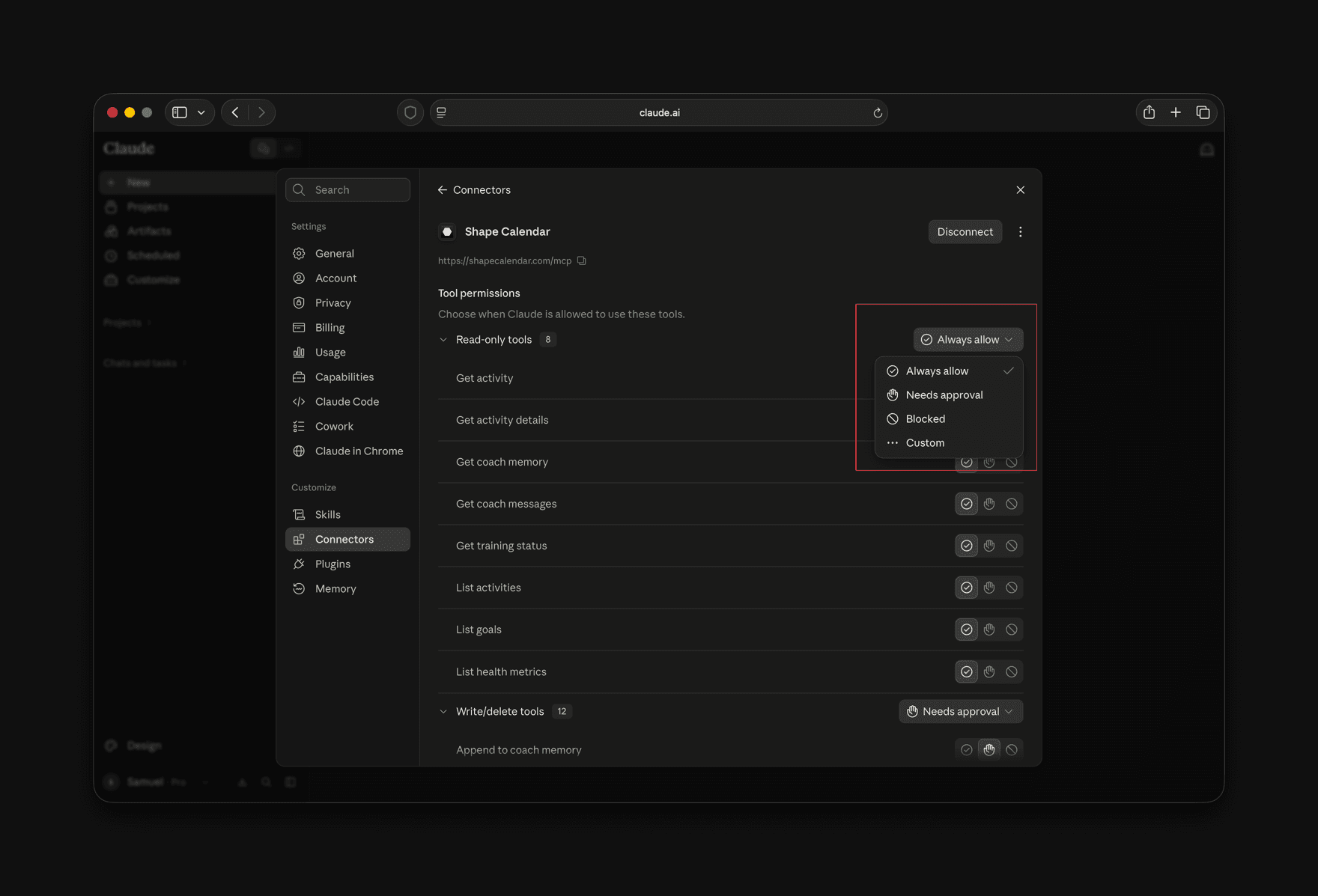
5. On the connector page, set Read-only tools to Always allow. Leave Write/delete tools on Needs approval if you want to confirm before Claude changes your calendar.
- 3
Start a new chat
Connectors are attached when a chat starts, so open a new one. Check that Shape is switched on in the tools menu, then ask something like this.
- Look at my last 14 days of Apple Watch workouts and plan next week. Two hard sessions, one long run, the rest easy.
- Open yesterday's intervals. Did I hold pace on every rep, and how long was I at threshold?
- Check my sleep, HRV and resting heart rate this week. Should I do today's session as planned?
- Create a threshold run for Thursday: 4x10 minutes at threshold, 3 minute jogs between. Send it to my watch.
Claude Code, Cursor and other clients
The same server works in any client that supports MCP over HTTP. In Claude Code, run:
claude mcp add --transport http shape https://shapecalendar.com/mcpFor ChatGPT, the connector steps are in the Garmin and ChatGPT guide, and step 1 above is the same. Cursor, Raycast and clients without OAuth use the URL plus a token from Settings, API access. Config examples are on the Apple Health MCP server page.
What Claude can read
Once connected through Shape, Claude has access to the following. The full tool list is in the MCP docs.
- Workouts
- Your recent workout history from Apple Health, whichever app recorded it: the Watch Workout app, running and cycling apps, trainers. Sport, duration, distance, average heart rate, elevation gain and training load. Claude can filter by date range and sport.
- Workout details
- For workouts recorded on an Apple Watch: heart rate, pace, cadence, running and cycling power, elevation and the route over the course of the workout, lap splits, and time in each training zone.
- Daily health
- Sleep with its stages, HRV, resting heart rate, respiratory rate, blood oxygen, wrist temperature, heart rate recovery, VO2 max, weight and body composition, steps and exercise minutes, one record per day. If Garmin is connected too, the two are merged.
- Training status
- Readiness, fitness, fatigue and form, your acute to chronic load ratio, and the planned load for the coming week.
- Writing to the calendar
- Claude can create, update, move and delete workouts, up to 100 in one call. Planned workouts sync to the Workout app on your Apple Watch, ready to start.
Apps and devices that write to Apple Health
Shape reads Apple Health, not the apps behind it. So any app or device that writes to Apple Health reaches Claude through the same permission, with nothing else to connect. Turn on Apple Health in that app’s settings and its workouts and health data show up in Shape from then on. What arrives is what the app wrote: usually the summary and heart rate, sometimes power, rarely the route.
Watches and rings
- Apple Watch
- Everything: workouts from the Workout app and Fitness+ with heart rate, pace, route and power, plus sleep, HRV, resting heart rate, respiratory rate, blood oxygen, wrist temperature and VO2 max. This is the device Shape is built around.
- Oura
- Sleep with its stages, HRV, resting heart rate, respiratory rate and workouts, once sharing is turned on in the Oura app. Claude then gets Oura recovery data alongside workouts from any other source.
- WHOOP
- Sleep, workouts, heart rate and HRV, once Apple Health sharing is turned on in the WHOOP app.
- Polar, Suunto and COROS
- Workouts, and for some models sleep, through each brand's phone app with Apple Health turned on. Heart rate inside the workout usually comes along, the route often does not.
Training apps
- Zwift
- Rides and runs with heart rate, power and cadence when the Zwift iOS app is allowed to write to Apple Health.
- Peloton
- Classes as workouts with heart rate when the Peloton app is allowed to write to Apple Health.
- TrainerRoad
- Workouts with heart rate and power when Apple Health sync is turned on in the TrainerRoad iOS app.
- Nike Run Club
- Runs with distance, pace and heart rate when Apple Health is allowed in its settings.
- Concept2 ErgData
- Rows, skis and bike erg sessions as workouts.
- Hevy and Strong
- Strength sessions as workouts with duration and energy, so lifting days count toward your load next to the endurance work.
Scales and sleep
- Withings
- Weight and body composition from the scale, and sleep from the sleep mat.
- Eight Sleep
- Sleep and its stages, plus heart rate and HRV measured in bed.
Two things to know. If the same workout reaches Apple Health from two apps, or from Apple Health and Garmin, Shape pairs the copies on import and keeps one. And Garmin Connect does not write to Apple Health at all, so a Garmin watch is connected to Shape directly, see the Garmin and Claude guide.
What Shape does not read
Shape is a training calendar for endurance sports. It reads the parts of Apple Health that bear on training and recovery, and leaves the rest on your phone. Through Shape, Claude does not see:
- Nutrition, water and caffeine
- Medications, symptoms and vitals like blood glucose or blood pressure
- Cycle tracking
- Mindfulness and mood
- Hearing, mobility and walking steadiness
- ECG and irregular rhythm notifications
If you want Claude to see all of that, a health exporter from the table above is the better tool, and nothing stops you from running both.
Limitations
- Shape imports your recent Apple Health history when you connect, then everything recorded after that. It does not go back through years of Apple Health.
- New workouts arrive in the background. Daily health data, like last night’s sleep, syncs when you open the Shape app.
- Heart rate, pace and route inside a workout come from the device that recorded it. A workout logged by hand in the Health app has none.
- Sending planned workouts to the watch needs an iPhone on iOS 18 or later. Watch settings and Apple’s own Fitness goals cannot be changed from Claude.
Troubleshooting
- Claude says there are no workouts
- The Shape iOS app has to be installed and given Health access first. Open it, go to Settings, Connections, and check that Apple Health is connected. If it says connected but nothing came in, open the iPhone Settings app, then Privacy & Security, Health, Shape, and make sure Workouts and the other categories are turned on.
- Workouts from Zwift, Peloton or another app are missing
- The app has to be allowed to write to Apple Health. In the iPhone Settings app, go to Privacy & Security, Health, Data Access & Devices, pick the app and check that Workouts is turned on, then record something and look again. Also check Shape's own setting: in Settings, Connections, Apple Health, the Apple Watch only switch skips workouts from other apps when it is on.
- Sleep or HRV is missing
- Workouts arrive in the background, daily health data syncs when you open the Shape app. Open it, wait a moment and ask again. HRV, sleep stages and wrist temperature also need a device that writes them to Apple Health, which usually means an Apple Watch worn overnight.
- A workout shows up twice
- Two sources recorded the same workout, usually Apple Health and Garmin, or two apps that both wrote to Apple Health. Shape pairs them on import and keeps one. If a pair was missed, ask Claude to pair the two activities, or do it in the calendar.
- A planned workout did not reach my watch
- Watch sync is a separate permission. In the Shape app, go to Settings, Connections, Apple Health, and turn on Sync to Apple Watch. It needs an iPhone on iOS 18 or later. The workout appears in the Workout app on the watch.
- The connector is added but Claude does not use it
- Start a new conversation. Connectors are attached when a chat starts, so an older chat will not see it. Then open the tools menu under the message box and check that the connector is switched on.
- Claude asks for permission on every call
- Open Settings, Connectors, choose Shape Calendar and set Read-only tools to Always allow. Otherwise every tool call needs a click.
- The consent screen does not open
- Your browser is blocking pop-ups, or you are signed out of Shape in that browser. Sign in to Shape first, then add the connector again.
Questions
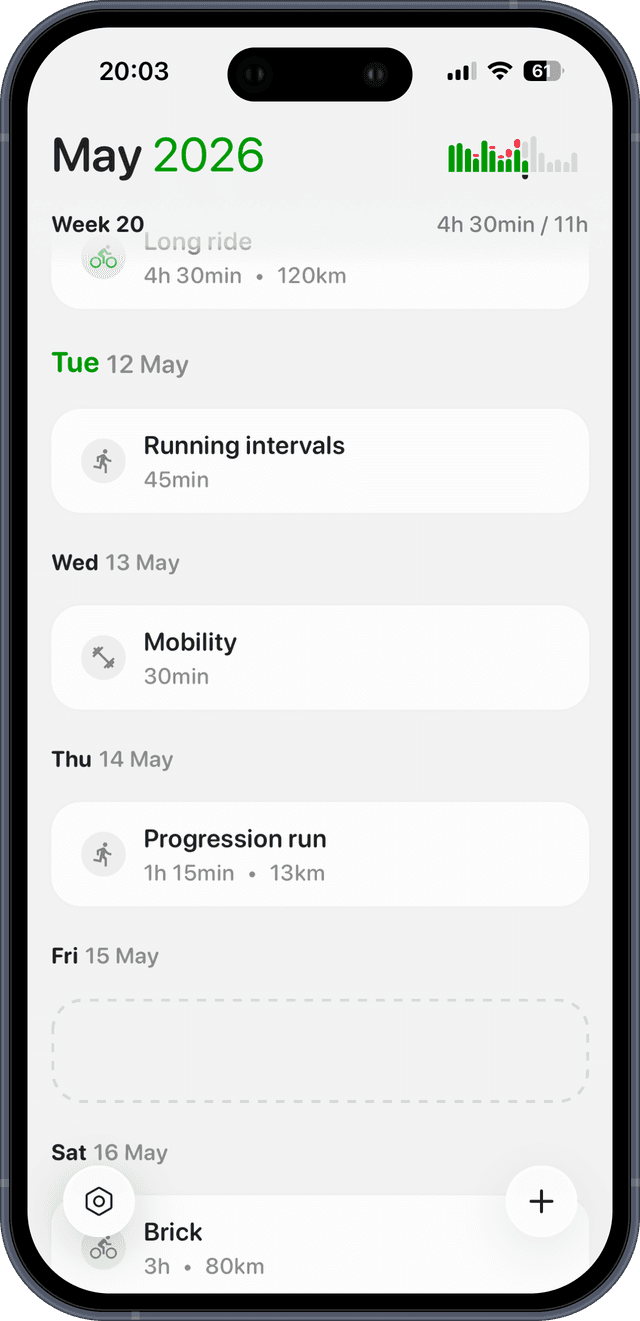
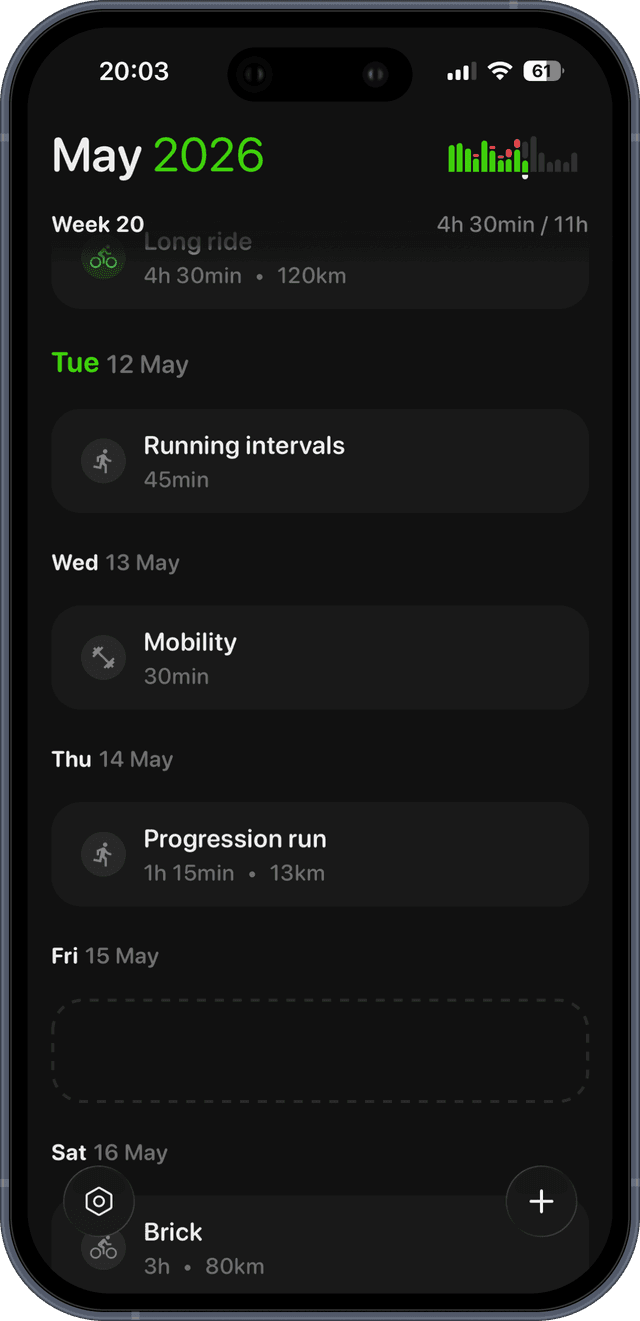
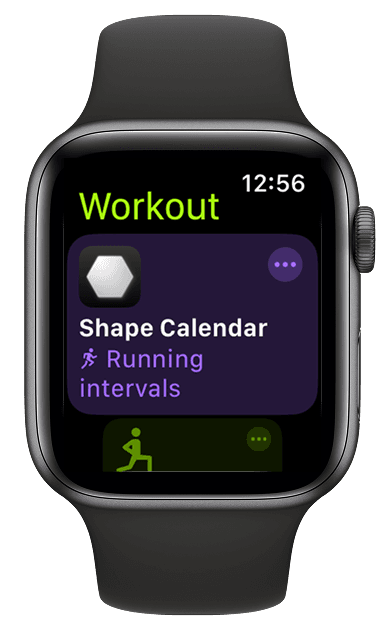
Let Claude plan your training. Shape sends it to your Apple Watch.
Connect Apple Health, connect Claude, and every workout Claude plans lands in the Workout app on your wrist. Free for 14 days.